
Loyalty Points Program
How to Set Up and Manage Loyalty Points
The Loyalty Program enables businesses or business groups to reward clients for their purchases. Loyalty points can be used at the Point of Sale (POS) as a payment method, allowing clients to redeem points for services or products. This guide will help you set up and manage loyalty points for your business or group.
Loyalty Points
- Select from the main meni: Main | Loyalty Points
- This will open the Loyalty Points dashboard where you can view and manage your clients' loyalty point balances.
- To set-up or manage your loyalty program, click on the Settings icon, which is located next to the search bar in the top-right corner.
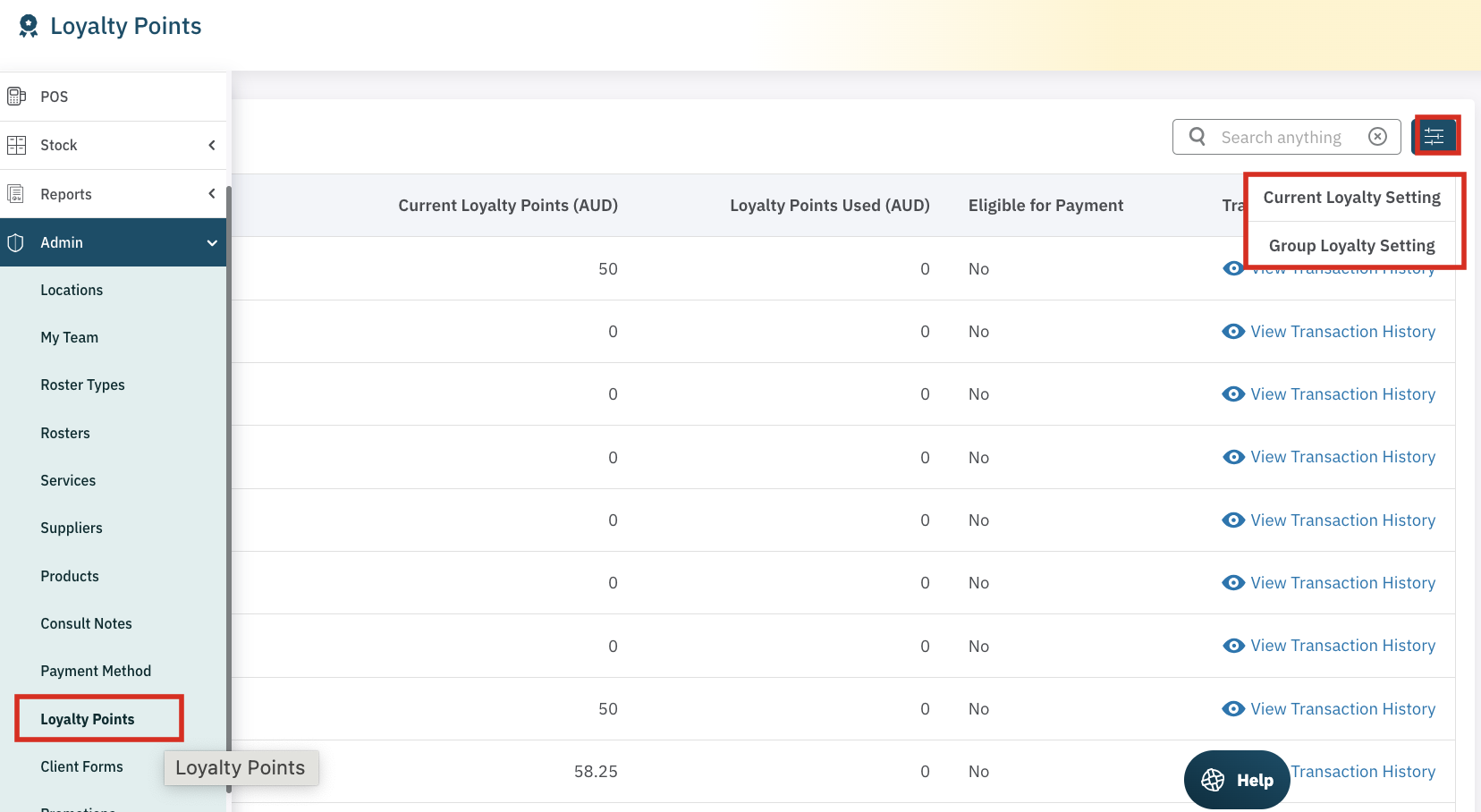
Configuring Loyalty Points Settings
There are two primary options available under Settings:
- Current Loyalty Settings
- Group Loyalty Settings (only available to Group subscribers)
1. Current Loyalty Settings
The Current Loyalty Settings allow you to configure your business's loyalty program, where you can set the rules for how points are earned and redeemed.
- Disable the Program: If you wish to turn off the loyalty program at any time, you can select the option to disable it.
- My Program: This option allows you to set up a loyalty program specifically for your business.
- Group Settings: Iƒ you are a member of a Group, you can select to participate in the Group's Loyalty Porgram.
Note: A Group Admin manages the loyalty program for all businesses in a group, such as franchises or buying collective businesses.
Setting the Points Accrual and Redemption Rules
In this section, you can set how many points a client will earn for every dollar they spend and the minimum points required before they can redeem their points.
Points Earned Per $100 Dollar Spend
Decide how many loyalty points are awarded for spend.
For example, if you choose to award 1 point per $1 spent, a client spending $100 would earn 100 points.
Once they reach 1000 points, they will have $100 to spend on future services or products.
Minimum Points Required to Redeem at POS
You can also set a minimum number of points that a client must accumulate before they are eligible to redeem them.
For example, if the minimum is set to 1000 points, clients will only be able to redeem their rewards once they’ve earned enough points for $100 in value.
This gives you control over how the program works — whether it’s a gradual reward system or an instant-use program.
Dollar Value Per Point
This setting allows you to define the value of each point that your clients earn.
For example, if 1000 points = $100, then 1 point = $0.10 in redemption value.
To make it easier, let's look at some Real Life Scenarios!
Scenario A: Tiered Reward Program
In this setup, clients earn 1 point for every $1 spent.
They can redeem their points once they reach 1000 points, which equals $100 to spend on future services or products.
Example:
A client spends $250 → earns 250 points.
Once they reach 1000 points (after $1000 in spend), they can redeem those points for $100 off their next visit.
After redemption, their point balance resets, and they can begin earning again.
This approach encourages clients to save their points for a larger reward and promotes return visits.
Scenario B: Instant Redemption Program
In this model, clients still earn 1 point per $1 spent, but they can use their points as soon as they earn them.
Each point has a value of $0.10, so clients can apply their balance toward purchases at any time.
Example:
A client spends $100 → earns 100 points, worth $10.
They can immediately use those 100 points for a $10 discount on their next service or product.
This model gives clients immediate gratification and encourages consistent engagement with your business.
View Client Loyalty Points
On the Loyalty Points Screen, a list of clients are displayed, showing their current loyalty point balance. This list includes:
- The value of the loyalty points in dollars.
- The amount of points used.
- Whether the points are eligible to be used as payment (minimum points threshold met)
- An expandable transaction history showing the sales that helped the client accrue points.
Search for a Specific Client
- In the top right corner, use the search function to find a specific client. By searching, you can view their detailed Loyalty Point History, including points accrued and redeemed.
View Loyalty Points in the Client’s File
- Promotions Tab: You can also easily track a client’s loyalty points in their Client File. Under the Promotions / Loyalty Points tab, the client’s loyalty points status is displayed, including the total points earned, used, and the remaining balance.
Using Loyalty Points to Purchase
Once the loyalty points program is activated and configured, clients can begin earning and using points. When a client makes a purchase:
- Points Accrue with Purchases: Loyalty points will automatically be added to the client's account based on the amount they spend, according to the rules you’ve set up.
- Note: Points used for payment do not earn loyalty points.
- Redeeming Points: Clients can use their accrued loyalty points as payment at the POS. Select Loyalty Points points from the list of available payment methods.
Key Points to Remember
- Loyalty points can be used as a payment method at the POS.
- Loyalty point accrual can be customised to suit your business model.
- Group Admins' can set global loyalty point settings that apply to all businesses within the Group.
- Points are tracked and displayed in the Client’s File under the Promotions tab, making it easy to manage client rewards.
- You can choose whether to allow points to be redeemed after the first purcahse or after a minimum threshold is met.
By configuring your Loyalty Points program in Cosmesoft, you can easily reward clients for their purchases, enhance customer loyalty, and provide a valuable incentive for repeat business.