
Register Tap To Pay with Apple
Obtaining Authorisation from Apple to use Tap To Pay Services
Apple requires Tap To Pay (TTP) users are verified businesses and the Busines Owner has accepted their terms and conditions.
Getting Started
Register your business with Apple using an existing AppleID or a new one created just for your business. You can learn more and register at https://business.apple.com
Accepting Apple Terms and Conditons
1. Install 2Hipp 2Pay
2. Login to https://consult.cosmesoft.app
Login as the Cosmesoft Business Owner on another device so you can scan the QR code from the iPhone where 2Pay is installed.
3. Link to your iPhone by following the prompts.
Once linked, 2Pay will check your status with Apple.
4. Link Your AppleID
When you first use 2Pay you will need to link your Apple Business Connect account. If you want to link to a different AppleID that the one you are logged into your device, select 'Use a Different Apple Account' and login.
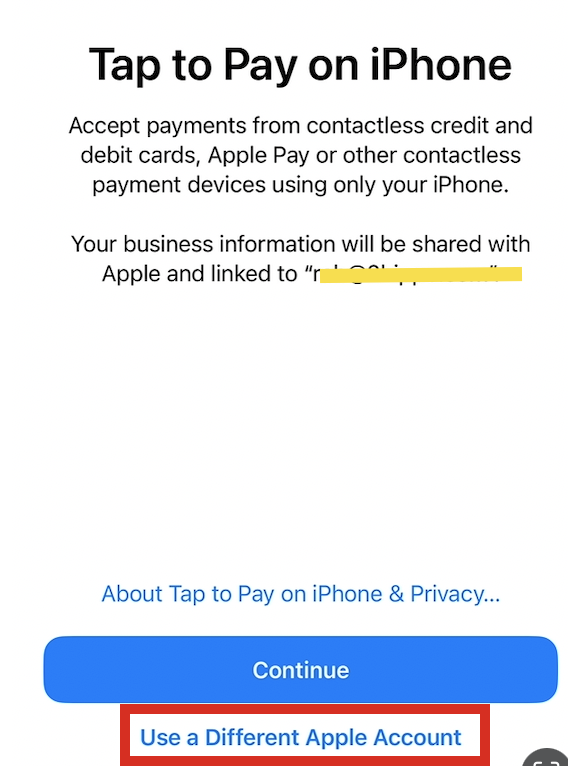
Follow the prompts to complete registration.
What if I am not the Business Owner?
If you are not the owner and you attempt to register for the first time you will reveive this warning:
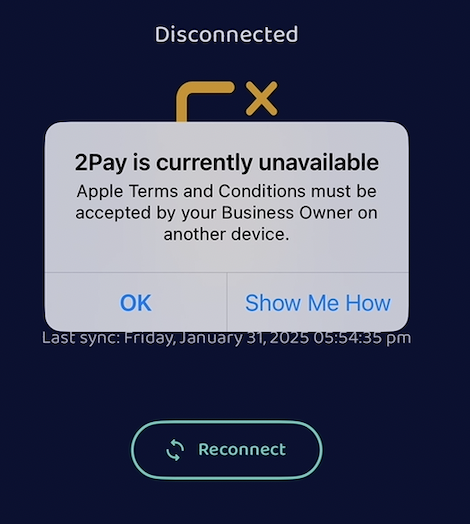
You can choose to:
- Ask the Busines Admin to login to https://au.consult.cosmesoft.app/login and link their device. Once registration has been completed you will be able to proceed.
- Unlink your device, ask the Busuness Admin to login and then proceed with linking.
<— PREVIOUS ARTICLE | NEXT ARTICLE—>